
Install the app
How to install the app on iOS
To install this app on your iPhone:
- Tap the Share button at the bottom of Safari.
Tap ... if Share is not visible, then Share - Tap Add to Home Screen
Tap View More and scroll down if needed to see Add to Home Screen, then Add to Home Screen. - Tap Add on the top right to confirm.
Note: This feature may not be available in some browsers.
You are using an out of date browser. It may not display this or other websites correctly.
You should upgrade or use an alternative browser.
You should upgrade or use an alternative browser.
Xpe 09 3060
- Thread starter Kiran04
- Start date
CargoPantsMan
Senior Member
- Joined
- 2014
- Posts
- 142
- Geo
- Chicago
Guessing you tried a whole new transfer dicorotron assembly?
Advertisement:
Kiran04
Senior Member
- Joined
- 2014
- Posts
- 165
- Geo
- Santa Fe
Yep. Still massive yellow over-toning. Every time I open the machine up there's yellow all over the yellow station and the pinscorotron underneath it, and that's without it even actually printing. Still will not pass cycle up time. Either the error I gave or XPE 09 1100
CargoPantsMan
Senior Member
- Joined
- 2014
- Posts
- 142
- Geo
- Chicago
How old is the yellow developer? If it's dumping, the toner concentration sensor may be gunked up and is seeing "too little" yellow toner and is dumping more yellow to compensate and then throwing off all of the cycle up checks, which would explain the 09-1100, in theory. Maybe.
SMAKCruiser
Member
- Joined
- 2012
- Posts
- 48
- Geo
- UK
Is it coating the entire belt? If it is, means you have an issue with the yellow charge station.
Kiran04
Senior Member
- Joined
- 2014
- Posts
- 165
- Geo
- Santa Fe
Alright, I've tried swapping the charging stations and I've tried swapping the module behind the charging stations and nothing has had any effect. The entire belt is still covered in yellow whenever the machine runs. What else would cause it to caste yellow?
SMAKCruiser
Member
- Joined
- 2012
- Posts
- 48
- Geo
- UK
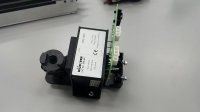
Did you swap the high voltage transformer with another station? Or the power supply?
SMAKCruiser
Member
- Joined
- 2012
- Posts
- 48
- Geo
- UK
Another possibility is your charge grid isn't connected to the High voltage connector in the back for some reason... A way to confirm its connected would be to measure the grid in standby mode... but I dont know if you have a meter to check it with.
SMAKCruiser
Member
- Joined
- 2012
- Posts
- 48
- Geo
- UK
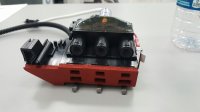
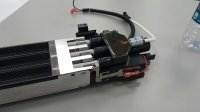
There's a connector in the back... I'll take a picture.
SMAKCruiser
Member
- Joined
- 2012
- Posts
- 48
- Geo
- UK
This connector goes on the back of the charge rail and mates up to the charge device. There is a small metal tab on the connector that connects to the charge grid. I've seen it where this gets bent or out of whack and doesn't make contact with the grid.
By the way, this is all assuming your yellow caste on your belt is a charge issue and not some ridiculously high toner concentration condition.
By the way, this is all assuming your yellow caste on your belt is a charge issue and not some ridiculously high toner concentration condition.
Attachments
Advertisement:
SMAKCruiser
Member
- Joined
- 2012
- Posts
- 48
- Geo
- UK
Doesn't seem to be anything wrong on this front. I pulled it off and everything looks like it lines up. Unless it's a wire break somewhere, I'm at a loss
You swapped this right?
Attachments
Forum posts represent the experience, opinion, and view of individual users. The Color Printing Forum does not necessarily endorse nor share the view of each individual post.
When making any potentially dangerous or financial decision, always employ and consult appropriate professionals. Your circumstances or experience may be different.
Similar threads
- Replies
- 1
- Views
- 1,129


- Replies
- 2
- Views
- 3,138
- Replies
- 4
- Views
- 3,707