Static Bar?

peels

tree killer :)
Joined
2010
Posts
1,113
Geo
southeast iowa, usa
OK, its often mentioned by me just how dry my area is. And I have become accustomed to being jolted awake by static. Im ok with it...

BUt, I am trying to run 9000 sheets of 8.5x11 that has come from wrapped reams, and it wont stack more than an inch before they start flopping around and crashing into each other-dropping the stacker. making it almost useless, since this is a multi page book. You can feel the charge on the paper from 4ft away. I feel like it should be doing better. This is a job that im volunteering to do on my own time. Its a memorial for a coworkers sister. :(

And, Yesterday, I was BS'ing with one of the kodak techs, as he was watching me struggle. "That shouldnt be like that, dont you have a static bar? even with dry paper and air it should at least run" Then we chatted about it for awhile... i remember when a static bar on a Digimaster would quit, it would do the same thing. clean it, or swap it out. move on. He assumed the bar would be a lot closer to the Fuser....

thoughts? could my static bar be going gaga? I'm trying to detail clean it this morning. Wanted to remove it, because you cant really get in there to the points. But can you unplug the wire into it? Seems stuck good, I'm afraid to break it lol

other printers run fine in this environment....

thanks!
 
There are static bars for the top output tray and for the stacker (at least on the 150). I had the same problem last season and my tech went in and cleaned them out. They were coated in paper dust and pretty much doing nothing. Got 'em clean and she stacked wonderfully.

Unfortunately, since this was almost a year ago, the details are no longer in my memory. I'll take a look at mine once this job is done and see if I can recall anything about how to get to it easily or remove it.
 
  • There are static bars for the top output tray and for the stacker (at least on the 150). I had the same problem last season and my tech went in and cleaned them out. They were coated in paper dust and pretty much doing nothing. Got 'em clean and she stacked wonderfully.

    Unfortunately, since this was almost a year ago, the details are no longer in my memory. I'll take a look at mine once this job is done and see if I can recall anything about how to get to it easily or remove it.


    thanks cargo.

    while I was just in there, I found the baffle that the static bar rides on missing the front spring. so it was drooping about 1/2" and paper not attaching to the stacker belts quick enough. thus the uneven stacking.

    still static and wont stack reliably though.... but i bet that fixes alot of unexplained stacker jams.

    :)
     
    Oh. That's the passive static bar. Getting that in place might help a bit. There's also an active static bar buried in by the VGT2 sensor. That's what I was referring to.
     
    Oh. That's the passive static bar. Getting that in place might help a bit. There's also an active static bar buried in by the VGT2 sensor. That's what I was referring to.


    0_o

    ok so I learned something today. didnt know that. thought it was stacker and top tray and thats it. :)

    see what having NO training gets me?. 6 years later. still training. HAHAHAHAHAHA

    thanks again.
     
    It wasn't covered in my training so you didn't miss anyway. My tech's coming in for some retrofits so I'll ask him how to get at it.
     
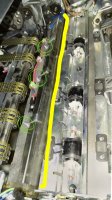
    Okay. Here's where the active static bar is (yellow line) held in by a baffle with three 5.5mm screws (green)
     

    Attachments

    • sketch1482947586974.jpg
      sketch1482947586974.jpg
      274.4 KB · Views: 805
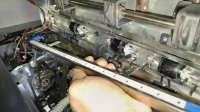
    The bar doesn't come out all the way, but get a swab or canned air on all those holes to get the pins in there nice and clean.
     

    Attachments

    • 20161228_121152.jpg
      20161228_121152.jpg
      245.6 KB · Views: 752
    wow man, thanks for the pics... I definitely appreciate it. but... thats actually the one I was working on. :)

    I took it out and cleaned it with distilled water and the air hose and a brush.

    i thought you meant there was another one.... wonder if this one is just bad.

    hmm.
     
    Oh! When you said it was hanging down I thought you meant the static brushes that you get to within the stacker pallet cavity. My bad man.
     
    Random thought, what condition is the grounding wire going to that active static bar in? Is it screwed down snug?
    Otherwise I'd guess the part itself could need replacing.
     
    installing an antiststic system that works is no big deal. you can have it up& running in no time
     
  • Random thought, what condition is the grounding wire going to that active static bar in? Is it screwed down snug?
    Otherwise I'd guess the part itself could need replacing.


    seemed ok to me.... Im gonna have Xerox gander at it next time they're in.
     
    Im just now revisiting this.

    file this under "angry ive let it go on so long" header

    for YEARS my stock coming out of the stacker has been fully charged. ALWAYS get a serious shock in the winter-if it stacks at all. I asked a few times with Xerox people... the pointed towards stock, static bars dont have many problems. nobody ever looked at it. AND, due to e being a realist when it comes to my terrible weird paper and expectations with that, I never questioned it. Ive been living with it.

    Then during last weeks developer and belt problems, visiting support tech grabbed a sheet and nearly died. he says "we had another Igen with a bar go bad not long ago, maybe youre having a problem too"
    SOB!

    orders one, we put it in the next day. Old one has cracks, and probably wasnt seated as per what @CargoPantsMan mentioned.

    stacker runs like butter! o_O

    advice: push your techs a little harder if there may be a problem.. :) im too nice.:D
     
    Forum posts represent the experience, opinion, and view of individual users. The Color Printing Forum does not necessarily endorse nor share the view of each individual post. When making any potentially dangerous or financial decision, always employ and consult appropriate professionals. Your circumstances or experience may be different.
    Back
    Top