
Clean print heads on Epson Photo 1400

windyplayer

New Member
Joined
2012
Posts
4
Geo
Coos Bay, OR, USA
I've had my Photo 1400 for several years and it's worked well. But over the past 6 months or so the black ink is bleeding over into the yellow and red.
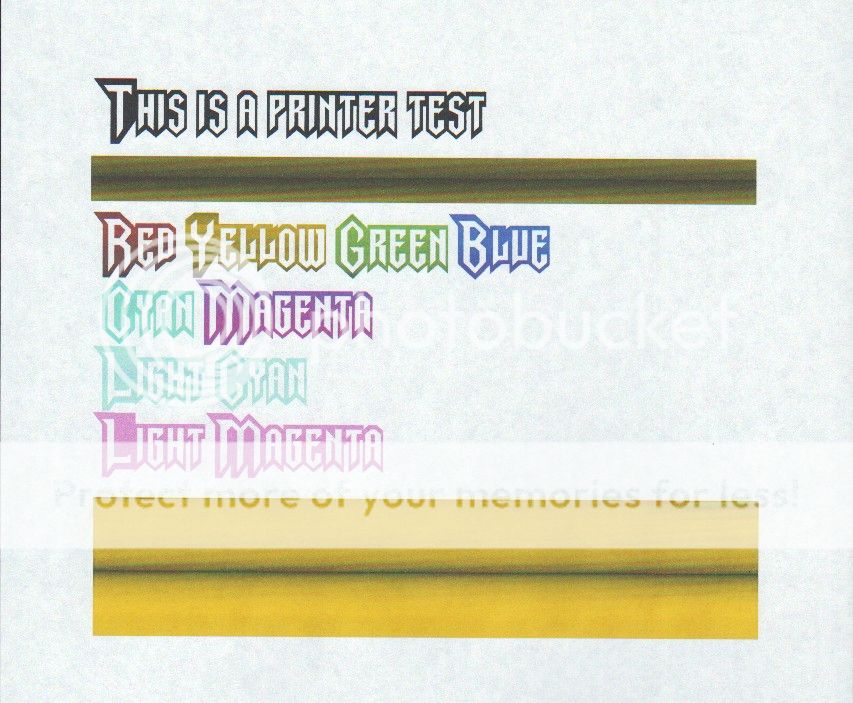
Ep1400_Color_Test_1.jpg


I have contacted Epson and they suggest the closest printer shop that is over an hour away. For an eight year old printer, it makes no sense to drive that far [twice], pay for repair, or ship the device. A new one is cheaper if I can't do the cleaning myself.

Does anyone have suggestions about how I might disassemble the print head to clean it? The nozzle clean and test functions show that all the nozzles are working, but it seems that ink has bled out onto the surface of the print head and a manual cleaning is required.

Thanks,
Windy
 
It looks a lot more like a bad printhead or logic, not a cleaning issue. The printhead being wiped out everytime it goes in to home position. You really have nothing to loose - you may dis-assemble it to satisfy you interest but most likely there will be nothing to find. The logic board drives the printhead to keep noozels closed or fire when it needed and that seems to be not happening in correct order. 8 years is not a bad service life for an inkjet printer but if you can afford so - get a new one rather than fixing this. Keep in mind that if this problem gets fixed, everything else is still 8 years old, whoever will fix it will guarantee the labor and part that was replaced, nothing else - don't get in to situation where you fixed a transmission and engine went bad in a week...
 
  • Is the waste ink cleaning pad where the printheads sit during a cleaning cycle overflowing with old ink and gunk?
     
    Is the waste ink cleaning pad where the printheads sit during a cleaning cycle overflowing with old ink and gunk?

    I assume that this is the case. I need break down instructions for the printer so I can clean the landing pad [sponge I assume].
    After a cleaning cycle and printing another copy or 2 of the file above, I was able to get decent printing quality. Not good enough for a 13x19 photo, but ok for something smaller and less demanding. So, the logic board and print head nozzles seem fine. Just a matter of ink bleed from landing pad. Anybody know where I can get break down instructions??
    Thanks,
    w
     
    You are in the wrong forum for that. Google 'service manual download'
     
    That is not about bother at all, you asking technical questions at professional printer's forum. Try Smarka.com Copytechnet.com or fixyourownprinter.com
     
  • When the nozzles on my desktop Epson printer blocked, I removed the cartridges and injected some near-boiling water into the printheads using a syringe. If you don't want a mess, put some blotting paper under the printhead to soak up the effluent.

    Wide format Epsons have a "maintenance tank for waste ink, whereas the desktops use a simple felt pad. It's definitely worth changing the pad or you could Google and look up the mod to convert your printer to use a proper waste ink tank.
     
    Forum posts represent the experience, opinion, and view of individual users. The Color Printing Forum does not necessarily endorse nor share the view of each individual post. When making any potentially dangerous or financial decision, always employ and consult appropriate professionals. Your circumstances or experience may be different.
    Back
    Top