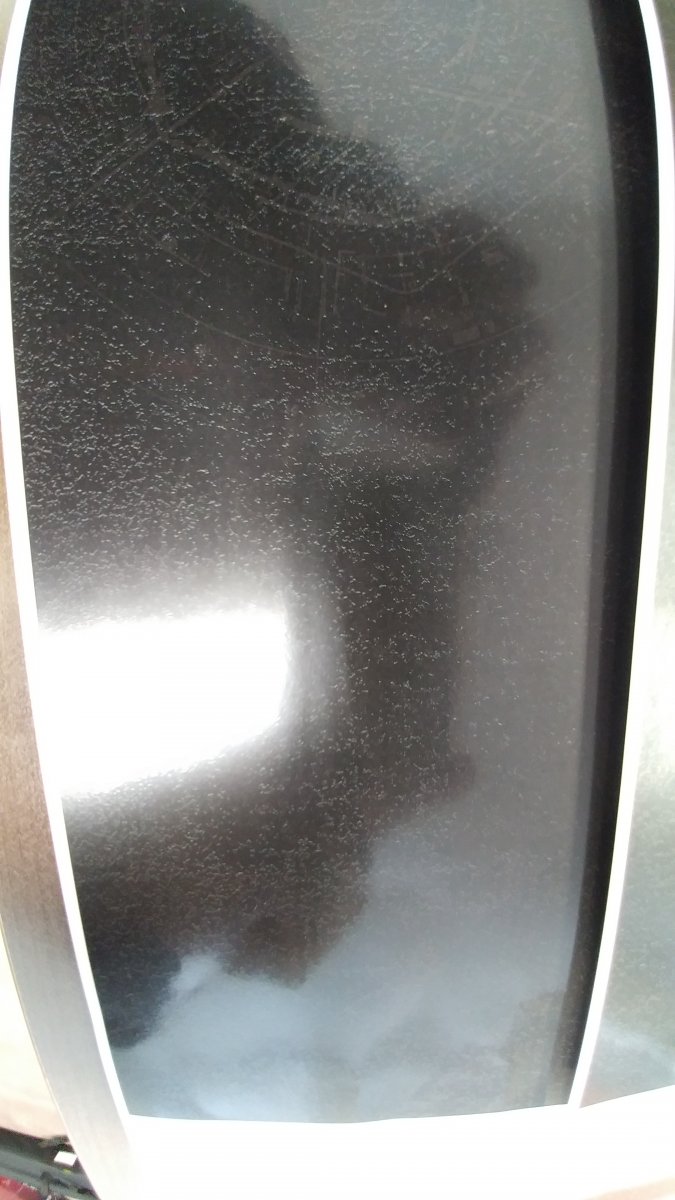
xerox 800 watermark problem

Shawn

Member
Joined
2018
Posts
23
Geo
Toronto,Canada
Hi,
recently our xerox 800 printer has watermark problem.see the attached pictures, the first print look pretty good, but after print 5 sheets, more and more white dots coming.
I think its the fuser problem, so changed fuser belt and oil wick according to the service manual.
but still the same.

any solution? thanks

20190129_152248.jpg
20190129_152243.jpg
 
Have you looked at it under a magnifier?? Could be paper dust from dirty paper. I think the first thing I'd try is to swap out stock and see if I can replicate the issue on new clean paper.

Also, look at the ibt belt. See if you can see any dust or anything on it. When I'm having imaging issues, I like to put binder clips (interlock cheaters) on the main front doors, run about 20 sheets, after a few sheets have exited, pull one of the clips to simulate opening the door. This way, you can inspect the sheets in all different sections of the machine to see where it might be happening. If the sheet before the fuser has the dots, then you know your problem is not in the fuser. You can also inspect the ibt belt at the same time as it should have at least 1 impression of your image still on the belt.

Hope that makes sense.
 
  • thank you Kringle, I switched paper, doesn't work.
    make hard stop to check. and its fuser problem for sure. before fuser, everything is good, after fuser the dot come. any idea?
     
    You want to ensure that everything in the fuser is clean. So do a full service if you did not. All of the rollers through the fuser and under the belt can get black gunk built up on them. We use Windex (only on a cool fuser) and paper towels to slowly work it all out. Also, inspect the sheet pad. That's something that is usually replaced along with the oil wick and belt. Also, inspect the large rubber pressure roller at the bottom to make sure it's clean and spins easily.

    When you scratch at the surface of the stock with a thumbnail, is the toner fully fused or is it scratching off easily?
     
    Check the pad from fuser belt assy.
    Good ideea to replace the pad.
     
    Initially when I read "white dots" i thought for sure it was something stuck on the transfer belt. but that picture... No belt would become that contaminated.
    I'm curious, is that an uncoated media? Accent or cougar, Lynx, etc?

    Is it duplexed or face down output? maybe the toner is separating on the second pass...
     
    Hi,there
    I did the fuser cleaning completely, still the same. so I was very frustrate. but I changed paper stock setting by increasing the thickness, for example, 100lb gloss text from 157gsm to 200gsm. the problem is gone!!! (but the same paper, same setting which works fine before.)
    but I still want to change the pad assy. according to the service manual, pad assy and oil wick should be change at the same time.
    where do you order parts from? any good online store or supplier?

    thanks you all
     
    try searching Alibaba or look on ebay or you can just order direct from Xerox parts.
     
  • It may very well have been the transfer voltage after all. Increasing the GSM will indeed increase fusing temperature, but the more significant internal adjustment would be to secondary transfer voltage.
     
    Back in 2017. I’ve been faced the most similar issue, after struggle I found the way to get rid from this watermark problem.

    There are two solutions.

    1. Replace the cartridge that is producing the coloured squiggle/

    2, dismantle an OLD cartridge and if it has a plain (non-spiral) foam roller, swap that (along with it's supports - the new type are a different size).

    Either of the above will cure the problem, but a new replacement cartridge may also show the problem in time, as it WILL have the spiral cleaning roller.
     
    Forum posts represent the experience, opinion, and view of individual users. The Color Printing Forum does not necessarily endorse nor share the view of each individual post. When making any potentially dangerous or financial decision, always employ and consult appropriate professionals. Your circumstances or experience may be different.
    Back
    Top