

printer55
Member
- Joined
- 2020
- Posts
- 82
- Geo
- USA
Hello guys,
Another day - another problem to solve.
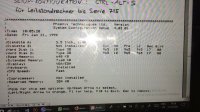
We got a warning thar the CMOS battery was failing. We did not recive another one in time so we got "Disk Boot Failure, Insert System Disk and Press Enter" It tries to start up but does not go further.
Is this due to the battery failing and we have lost the connection?
The battery is Dallas DS1287 but we got another which is DS 12887A to try. But that did not work either and the disk does not boot.
Do we need the DS 1287 for this to work.
Or do we need to put in all the disks to make the system work again?

Another day - another problem to solve.
We got a warning thar the CMOS battery was failing. We did not recive another one in time so we got "Disk Boot Failure, Insert System Disk and Press Enter" It tries to start up but does not go further.
Is this due to the battery failing and we have lost the connection?
The battery is Dallas DS1287 but we got another which is DS 12887A to try. But that did not work either and the disk does not boot.
Do we need the DS 1287 for this to work.
Or do we need to put in all the disks to make the system work again?


 ....ooww....sory i'm not paying attention to the date