OKI ES9431 - I have some questions for which I am looking for opinions

Nicky G.

Member
Joined
2024
Posts
18
Geo
Italy
@OkiTech
I start by specifying that I have the Fuser that has the pressure roller cut and the fuse film scratched (as shown in the photo).

1. The drums do not appear to be scratched

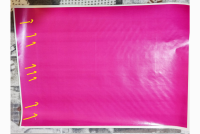
2. Looking at the CMYK prints, apart from the lines on the fuser film sleeve, those horizontal streaks and the non-compact and homogeneous toner could be caused by the fuser and the damaged pressure roller?

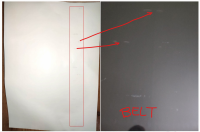
3. When I print I always get stains (like on the white sheet), even when I print a white sheet. These stains remain on the BELT as toner. I have cleaned the belt several times with alcohol, I have also cleaned the belt toner cleaning spatula and the belt accumulation tank. But I can't solve the problem. What could this be due to? What should I clean?

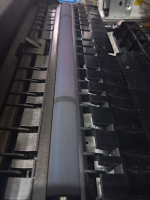
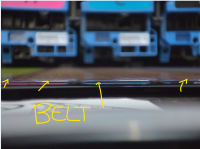
3a. Always on the belt I see that a light toner dust forms in colored bands of 10 cm (CMYK) is this normal? Or does the spatula have to clean the toner 100%? Then why does it make these color bands? even though it doesn't print any bands...(bands parallel to the Drums...

4. the 2nd transfer roller (the one under the beld) has those toner stains, is this normal? How could it be cleaned?

belt1.jpeg
belt.jpg
cmyk (2).jpg
cmyk (3).jpg
cmyk (4).jpg
cmyk (1).jpg
fuse (2).jpg
fuse (3).jpg


fuse (4).jpg
 
The fuser unit is done. Just replace it, looks like it was time to do so long time ago
 
  • L'unità fusore è fatta. Basta sostituirla, sembra che fosse ora di farlo tanto tempo fa

    hi @OkiTech
    Yes the fuser needs to be changed, I bought the printer used a month ago and I'm understanding the things to replace and the print quality problems.
    What can you tell me about points 2,3,3a,4?


    upload_2025-2-12_22-33-42-png.15504

    upload_2025-2-12_22-38-3-png.15507

    upload_2025-2-12_22-35-5-png.15505

    upload_2025-2-12_22-37-17-png.15506
     

    Attachments

    • upload_2025-2-12_22-33-42.png
      upload_2025-2-12_22-33-42.png
      1 MB · Views: 415
    • upload_2025-2-12_22-35-5.png
      upload_2025-2-12_22-35-5.png
      1.4 MB · Views: 395
    • upload_2025-2-12_22-37-17.png
      upload_2025-2-12_22-37-17.png
      918.9 KB · Views: 408
    • upload_2025-2-12_22-38-3.png
      upload_2025-2-12_22-38-3.png
      1.4 MB · Views: 408
    These could be nicks on the fuser and will go away once fuser is replaced or could be nicks of the belt as well, you may need new belt as well. This should not be as hard to pin-point.
    take that sheet with flaws and look at corresponding flaws on the fuser, belt, Transfer roller. Belt, once you get it out of the printer is pretty exposed, so should not be so hard to fins where these thingies are coming from. Just keep that belt flat, do not flip it on the side or upsidedown, same goes for drums, etc,
     
    @OkiTech

    The vertical stripes are caused 100% by the scratched fuse film and the damaged pressure roller.

    The horizontal stripes present on all 4 colors instead that do not give a nice full and compact toner coverage of the full background, what could have been caused by? I suppose from the pressure roller that does not press the foner homogeneously on the paper and these streaks are created?
    If they were the drums it should not have appeared on the individual colors.

    As for the toner on the belt (very thin noticeable only if I put my eyes horizontal to the belt) in colored bands of 10cm wide CMYK is it normal?

    I cleaned the Belt with alcohol, several times, cleaned the rollers underneath, disassembled and cleaned the spatula and the residual toner of the waste behind the belt cleaning spatula.
    As soon as I assembled it after cleaning if I send a white print, the sheet comes out clean. If I send a print with the toner, and then a new white sheet those marks appear again. I understand that it is some toner that remains on the belt, but I do not understand where, the cleaning spatula seems perfect, I also cleaned it.

    The 2nd transfer roller (the one under the belt), is it normal to leave that cyan toner? I also cleaned it with compressed air.
    How could I clean it? alcohol?

    PS: this printer has the Efi Fiery C9 Driver, do you know it? I have some questions.
    (It prints much better than the OKI PS driver)


    upload_2025-2-12_22-58-47.png

    upload_2025-2-12_22-59-17.png
     
  • The "Spatula" is really Cleaning Blade. I am not entirely sure this is something that is available separately but replacing it is not likely to solve the problem. When/if this Blade fails, there will be constant dirty line on the belt. It can not cause just a spots. This belt is complicated device, it has x4 Transfer rollers, Belt itself and various pulleys, if it is bad - it is bad.
     
    Forum posts represent the experience, opinion, and view of individual users. The Color Printing Forum does not necessarily endorse nor share the view of each individual post. When making any potentially dangerous or financial decision, always employ and consult appropriate professionals. Your circumstances or experience may be different.
    Back
    Top